Turkey
Blocks affect adult sites, as well as some news sources and social platforms.
Source“This site is blocked” instead of a video?
Install Forbidden Pass, tap “Turn on” and try opening our site again. Keep watching in your usual browser.
Pages and videos connect directly.
Your IP stays yours.
Our sites. One tap away.
Open our sites in your browser.
We will reconnect when you switch networks.
About your dataIf it all worked yesterday
In Turkey and other countries, internet providers may block adult sites at the authorities' request. One day, a block message replaces your usual video. First, try opening our site with Forbidden Pass.
Blocks affect adult sites, as well as some news sources and social platforms.
SourceAccess is restricted over adult content and gambling. Sometimes entire platforms are blocked.
SourceRestrictions affect adult sites and material the authorities consider unacceptable for religious or political reasons.
SourceThese are examples of blocking described in Freedom House reports for 2024–2025. Blocking methods vary by country and internet provider.
Forbidden Pass helps restore access to sites in our network on Android. Install the app once, turn on access and return to your browser. It may help if your provider blocked access through DNS — the system that finds a site's address.
Turn on Forbidden Pass and open our site again. It's worth trying before you look for another mirror.
No registration or card details required. Downloading and using the app is free — no subscription appears after installation either.
Wait for “Access is on”, return to our site in your browser and refresh the page. You don't need a separate browser.
The app helps you access supported sites in our network. It does not change your IP address or bypass every type of block. Learn more in the FAQ
When you need access to our sites
Start with Forbidden Pass: it's completely free. Video loads directly from the site, with no intermediate VPN server.
| What matters | Forbidden Pass | Typical VPN* |
|---|---|---|
| Viewing speed | Pages and videos connect directly. No extra route through a VPN server or dependence on how busy it is. | Speed also depends on the VPN server: its load and route to the site. |
| Your IP address | Stays yours. The app doesn't replace your IP or switch you to another country. | Sites usually see the VPN server's IP address instead of yours. |
| Pages and videos | Don't pass through our servers. You receive content directly from the site. | Content passes through the VPN provider's server. |
| Cost | Completely free. No subscription, hidden charges or in-app ads. | Depends on the service: a paid subscription or the terms of a free plan. |
* This comparison covers VPNs that route web traffic through their servers. Individual VPN services may have different settings and terms. Speed depends on your network and the site itself; a speed increase is not guaranteed in every case.
To work, Forbidden Pass sends requested site names and your IP address to the DNS checking service. Page and video content does not pass through it. How data is used
First, download the app
The file is just 1.2 MB. Install the app, tap “Turn on” and open our site again. No registration or payment required.
Download Forbidden PassFree · Android 8.0+ · version 0.5.8
The scan result applies to this file and does not guarantee the absence of all risks.
No downloadable version is available yet.
After downloading
If Android asks for permission, here's what to tap.
In your browser's “Downloads” section, tap Forbidden-Pass-0.5.8-release.apk. Then tap “Install” and open the app.
Tap “Settings” and allow installation from the browser you used to download the file via “Allow from this source”. Then return to the file. Labels may differ between phones.
Open Forbidden Pass. The first time you turn it on, read Android's request and tap “Allow” or “OK”.
This system permission lets the app help your phone find our sites' addresses. Pages and videos use your regular connection.
View the actual Android request (in Russian)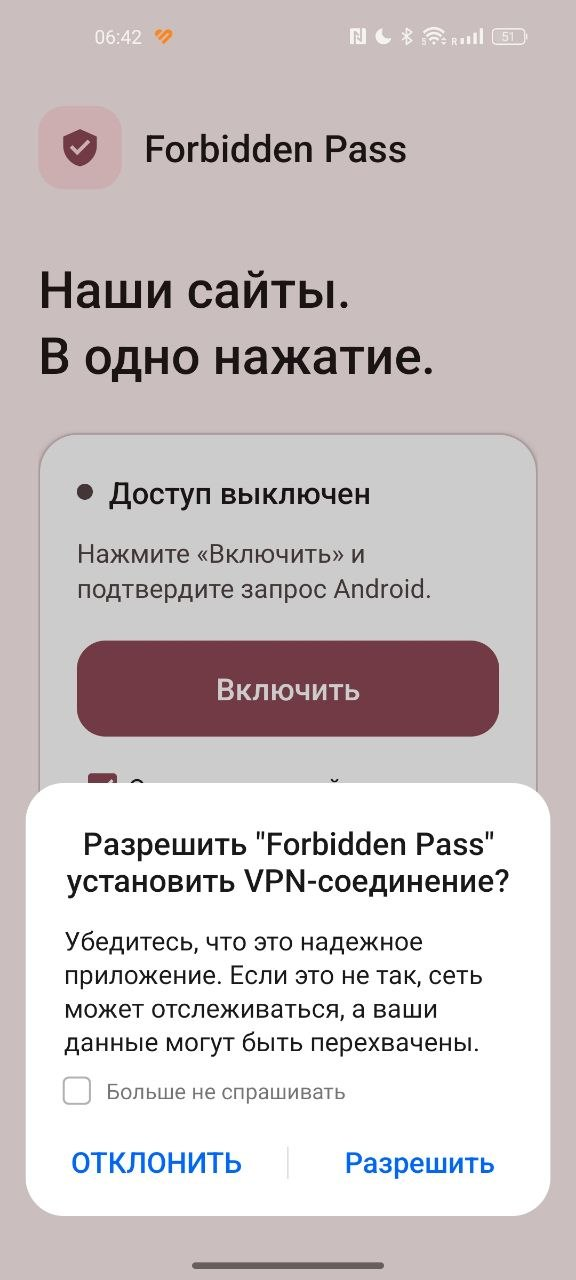
Wait for “Access is on”, return to our site in your browser and refresh the page.
If “Open our site” is checked, the app checks access to ixxx.video and opens it in your browser. Keep the app on screen until the browser opens. You can open other sites in our network manually.
App installed and turned on?
Return to the page that was blocked and refresh it. Or open our site using the button alongside.
Check the result in your browser. This page does not automatically detect whether the app is on.
The site opens in a new tab. Then return here.
Did the page load?
Supported sites in our network, including ixxx.video. The list updates on the server, so adding sites usually doesn't require reinstalling the app. We don't promise access to every site on the internet.
Yes. Forbidden Pass has no subscription, hidden charges or ads. You don't need to create an account or enter card details.
Android uses VPN permission for the app to work. But Forbidden Pass only helps with DNS — finding a site's address. Your IP address stays the same, and pages and videos do not pass through the connection service. The app does not provide anonymity or replace a full VPN.
Android usually allows only one VPN app to run at a time. If the connection won't turn on, disable your other VPN and try again. Do not enable the system option to block connections without VPN for Forbidden Pass.
There may be another cause of blocking, a temporary site problem or a browser setting. First check your internet connection, then close and reopen the tab. If the app asks you to change “Private DNS”, select “Automatic” or “Off”. Your browser's built-in secure DNS may also work independently of the app.
The app may not help with IP blocks or other blocking methods. Tell us about the problem so we can check it. Report a problem
The app remembers your choice and tries to reconnect after you change Wi-Fi or mobile networks. If the site won't open after your phone wakes up, return to the app and wait for “Access is on”. Some phones restrict background activity, which can prevent reconnection.
If you have an older version, install 0.5.8 over it. You don't need to uninstall the app. It checks for new versions about every six hours and checks when opened if a check is due. Android may delay checks while asleep or offline.
“Update automatically” is on by default. Android may ask for permission or installation confirmation. If you turn this option off, the app still checks for new versions but won't download or install them automatically.
No registration required. Page and video content does not pass through the connection service. To work, the app sends our server the names of requested sites, including those outside our network, and the server receives your IP address.
For diagnostics, we keep a check log for up to 30 days: time, site name, result, rules version, IP address and country based on Cloudflare data. Cloudflare also processes site names and IP addresses, and Google processes some requests, under their own privacy policies. Cloudflare privacy policy · Google privacy policy
We count first launches using a hash of a random installation number, the date and an indication of a new or existing installation. We also store the country of the first connection if available. These statistics contain no IP addresses, device identifiers or advertising identifiers and are not linked to site requests. Settings are stored on your phone.
The feedback form stores only the fields you submit. A reply address is optional. The site does not use third-party advertising analytics.
Site still won't open?
Send the site address and what Forbidden Pass displays. Your message reaches our team so we can investigate. You can also ask a question or suggest an improvement here.
Your phone model, Android version, site name and the text on the app's screen. No need to send passwords or other personal details.